Generate a seating report
Generate a seating report
If your event uses reserved seating, download a seating report to see which seats have been booked and who they're assigned to.
Download your seating report
1
Log in to Quicket.
2
Go to Organiser Hub → My Events.
3
Select your seated event.
4
From the Event Dashboard, select Export. 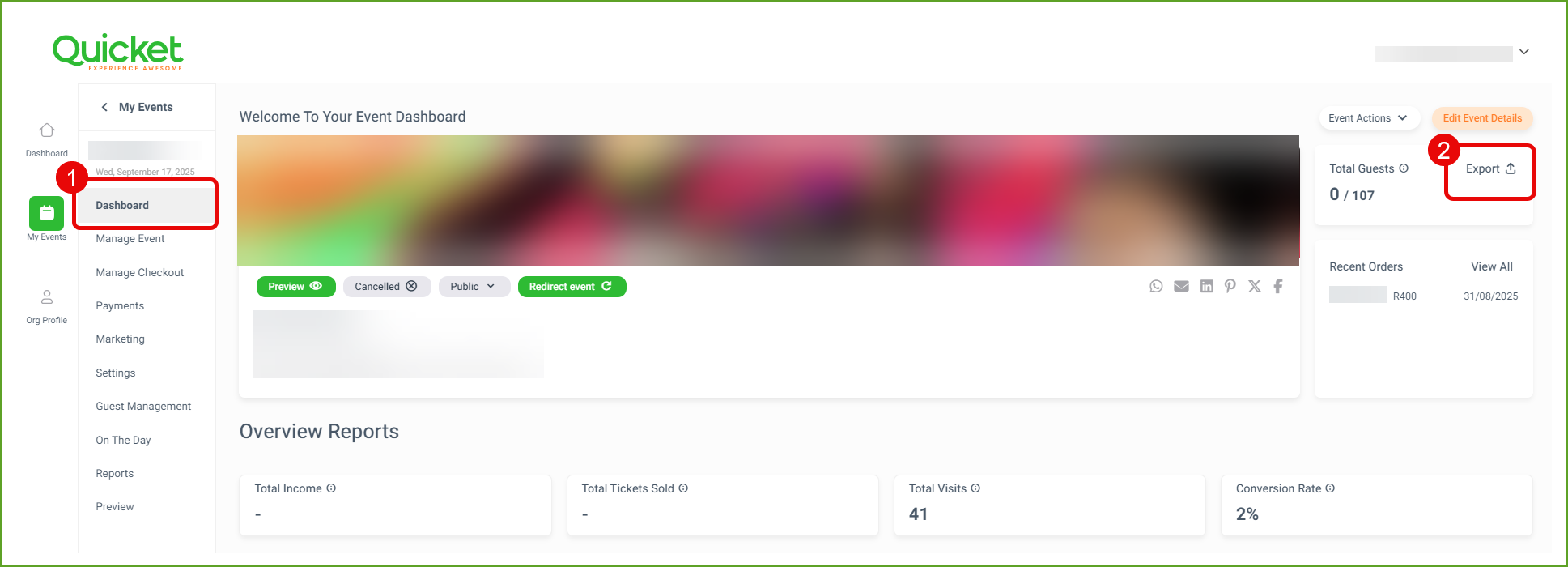
A CSV report will download to your computer.
What's included?
The report can include:
- Order number
- Payment reference
- Ticket number
- Ticket barcode
- Purchase date
- Purchaser email
- Ticket type
- Seat number
- Team name
- Team member type
- Sequential number
- Price paid
- Payment method
- Discount code
How can I use the report?
The seating report can help you prepare your venue and resolve guest seating queries.
Check which seats are occupied
Review the booked seats in your venue and see which seating areas have already been allocated.
Find a guest's seat
Use the booking, ticket and seat information in the report to help locate the seat assigned to a specific guest.
Prepare front-of-house staff
Give your front-of-house or seating team the information they need to help guests find their seats.
Resolve seating queries
Check seat assignments when a guest has a question about their booking or allocated seat.
Review ticket sales by seating area
Use the seat and ticket information to understand how different seating areas are selling.
What’s next?
Continue managing your seating setup, guest information and event-day access.